 How-to
Best Practices for Subscription Meal Kit Inventory Storage
Last Updated: November 6, 2026
Quick Summary
Meal kit inventory storage works best as a workflow, not a cooler setting: label every kit with receive and use-by dates, load new deliveries behind old ones, and keep chilled food between 0 °C and 10 °C. Assign one checklist owner per shift and reconcile counts weekly on your highest-velocity SKUs.
- Check cooler and freezer temperatures at open and close, and record readings in one shared log.
- Split the cooler into zones: raw proteins low and separate, produce in its own zone.
- Assign one SKU per ingredient, not per kit, so shared ingredients draw from one pool.
- Deduct stock at pack time for subscription kits, since it matches what left the shelf.
- Forecast from active subscriptions due to renew, minus pauses, skips, and cancellations before cutoff.
Table of Contents
- Why Subscription Meal Kit Inventory Storage Breaks Without a System
- Build a Meal Kit Inventory Checklist That Actually Gets Used
- First In First Out Food Inventory Rotation for Perishable Kits
- Meal Kit Cold Storage Organization: Temperature, Zones, and Packaging
- POS Inventory Integration: Keeping Stock Counts Honest
- Preventing Cross-Contact and Contamination in Shared Storage
- Cutting Food Waste With Demand Forecasting and Replenishment Rules
- Turning Storage Discipline Into Repeat Orders and Loyal Regulars
- Frequently Asked Questions
Why Subscription Meal Kit Inventory Storage Breaks Without a System
The global meal-kit market was valued at USD 29.47 billion in 2025 and is estimated to reach USD 34.72 billion in 2026, according to Market Data Forecast's market estimate.
Restaurant owners who run recurring boxes alongside their regular service often find their walk-in fills up, their counts drift, and nobody can say which kit used which ingredient first. For the broader playbook, see how to manage restaurant subscription inventory and supply.
But first, here's what most guides get wrong. They treat storage as a cooler setting. Storage is a workflow, and it touches ordering, packing, fulfillment, and retention.
Meal kit inventory storage is the set of rules and checks that keep pre-portioned ingredients safe, rotated, and countable from delivery to doorstep.
Build a Meal Kit Inventory Checklist That Actually Gets Used
A checklist only works if it takes less time than the problem it prevents. Keep it short, assign one owner per shift, and tie each item to a physical action.
What Belongs on the Daily Checklist
Daily items cover what changes fast:
- Check cooler and freezer temperatures at open and close
- Record readings in one shared log
- Rotate older kits to the front before packing
What Belongs on the Weekly and Monthly Checklist
Weekly and monthly items catch drift:
- Full SKU count against the system record
- Review short-dated stock and plan menu use
- Audit labels and allergen tags
| Frequency | Owner | Time | What It Catches |
|---|---|---|---|
| Daily | Packer | 10 min | Temperature gaps, rotation misses |
| Weekly | Shift lead | 30 min | Count drift, short-dated stock |
| Monthly | Manager | 60 min | Shrinkage, supplier errors |
First In First Out Food Inventory Rotation for Perishable Kits
First in first out food inventory rotation means the oldest usable stock leaves first, every time. It is the cheapest waste control you have.
Make it physical, not mental:
- Label every kit with a receive date and a use-by date
- Load new deliveries behind old ones
- Give each shelf one direction of flow
Watch out: rotation fails when two people load shelves in two directions. One shelf, one flow.
Meal Kit Cold Storage Organization: Temperature, Zones, and Packaging
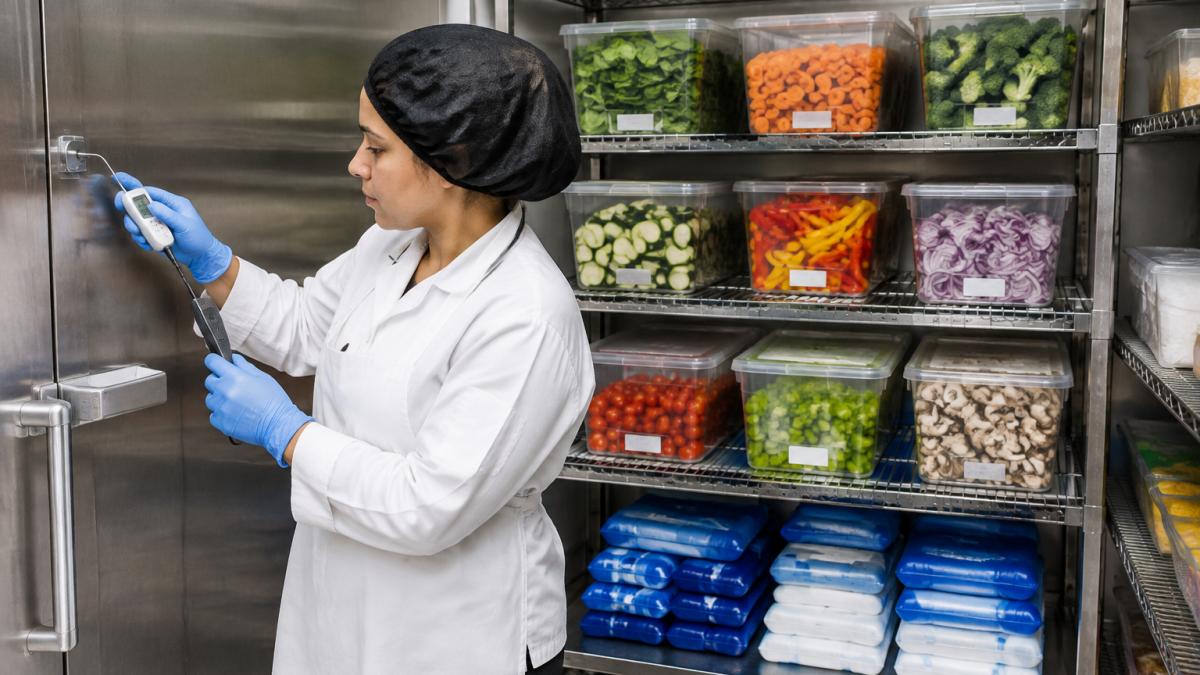
Cold storage organization is the layout that keeps temperature steady and packing fast. A review of meal-kit delivery services recommends holding chilled food between 0 °C and 10 °C during storage and transport, per the meal-kit dietary review.
Setting Up Cold Zones and Insulated Packing
Split the cooler into zones by temperature need and by kit. Raw proteins go low and separate. Produce sits in its own zone. Insulated liners and gel packs live at the packing station, not in the cooler.
FoodSafety.gov advises checking that meal-kit companies use insulated packaging and materials such as dry ice or frozen gel packs to keep perishable food cold in transit, as noted by FoodSafety.gov's meal kit safety tips.
POS Inventory Integration: Keeping Stock Counts Honest
POS inventory integration is the link that lets a sale or a subscription renewal update stock automatically. Without it, your counts are a guess.
Map Kits to SKUs Before You Connect Anything
Every kit is a bill of materials, not a single item. Build the map first:
- List each kit and every ingredient it consumes, with the quantity per kit
- Assign one SKU per ingredient, not per kit, so shared ingredients draw from one pool
- Note which ingredients are shared across kits, those are your conflict points
A common pattern is a kit that shares a protein with two other kits. If each kit carries its own SKU, the same physical stock gets counted three times and you oversell. One ingredient, one SKU.
Choose the Connection Method
There are three practical paths, and the trade-offs are real:
- Native integration: fastest to launch, but limited to the fields the vendor exposes
- Middleware or iPaaS: flexible field mapping and retry logic, but adds a subscription and a vendor to manage
- Direct API: full control over event handling, but you own the maintenance and error handling
Most subscription operations start native and move to middleware when they need custom retry rules or multi-channel sync.
Set the Deduction Trigger Deliberately
When does stock actually leave the count? Three options:
- At order creation: protects against overselling, but locks stock for orders that may be canceled
- At pack time: matches physical reality, but leaves a window where the count is optimistic
- At shipment: cleanest for accounting, but the latest and riskiest for stockouts
For subscription kits, pack time is the common choice because it aligns the count with what actually left the shelf. Whatever you pick, apply it to renewals, one-time orders, and manual adjustments the same way.
Handle Sync Failures and Reconcile
Sync is not fire-and-forget. Plan for these failure modes:
- Duplicate events: a renewal webhook fires twice and deducts stock twice. Use an idempotency key per order event.
- Delayed updates: the POS posts the sale hours later. Set a sync lag threshold and alert when it is exceeded.
- Failed syncs: the connection drops mid-batch. Queue events and replay them in order.
Run a weekly reconciliation report that compares the system count to a physical count on your highest-velocity SKUs. Flag any SKU where the difference exceeds your set tolerance, investigate the cause, and log the fix. Watch out: reconciling only at month-end hides drift long enough to cause a stockout on a renewal week.
Add Your Restaurant →
Subscription-Specific Metrics to Track
General retail metrics miss the subscription layer. Track these alongside them:
- Stockout rate for subscribers: how often a renewal cannot be fulfilled from available stock
- Fulfillment accuracy: kits shipped complete and correct as a share of kits shipped
- Renewal demand: forecast units committed to active subscriptions before the cycle closes
Separating available, committed, and returned stock is the discipline competitors skip. A returned kit is not automatically available stock, inspect it, decide its fate, and post the adjustment explicitly.
If you want the deeper version of the wiring, our guide on integrating digital loyalty programs with cafe POS walks through the same connection patterns.
Preventing Cross-Contact and Contamination in Shared Storage
Shared storage raises risk fast. Federal rules require that storage and transport conditions protect food from allergen cross-contact and biological, chemical, and physical contamination, per 21 CFR 117.93.
Practical controls:
- Dedicated allergen bins with sealed lids
- Separate scoops and tools per allergen group
- Color-coded labels on every container
The FDA's best practices for online food delivery also cover preventive controls, packaging, and physical and chemical hazards, according to the FDA's online delivery guidance.
Cutting Food Waste With Demand Forecasting and Replenishment Rules
Waste falls when ordering follows subscriber demand, not habit. Subscription forecasting can look at the subscriber base itself, because next week's demand is already partly known: it is the active subscriptions due to renew, minus the pauses, skips, and cancellations that land before the cutoff.
Forecast From the Subscription Base, Not Last Month's Sales
Build the demand number in layers:
- Start with active subscriptions due to renew in the cycle
- Subtract confirmed pauses and skips
- Subtract cancellations received before the cutoff
The result is committed demand. Order to committed demand plus a buffer for late changes, not to last month's shipment volume. A common pattern is a menu change that spikes new signups while existing subscribers skip the same week, the two effects cancel in the total but not in the ingredient mix.
Set Replenishment Rules by SKU
Rules beat habit. For each SKU:
- Set a reorder point based on supplier lead time plus a safety margin for late deliveries
- Cap order quantities by forecast renewals for the cycle, not by shelf space
- Separate long-lead ingredients from short-lead ones and set different reorder points for each
Watch out: a reorder point set on average lead time fails every time a supplier runs late. Use the longest recent lead time, not the average.
Handle Lifecycle Edge Cases Before They Hit the Count
Subscription changes move stock in ways general retail never sees:
- Skips: release committed stock back to available before the order cutoff
- Pauses: same as a skip for the paused cycles, but keep the subscriber's allocation rules intact
- Plan changes: a subscriber moving to a larger kit changes the ingredient draw, recalculate committed stock at the change, not at pack time
Each of these is a stock event. If your system does not post it, your count drifts and your forecast is wrong.
Review Spoilage Weekly and Close the Loop
Track spoilage by SKU and by cause: over-ordering, short-dated delivery, rotation miss, or damage. Review weekly, not monthly, because a weekly review catches a bad supplier batch before it becomes a month of waste. Adjust the reorder point or the buffer for any SKU that spoils twice in a row for the same cause.
For the full playbook, see how to automate ingredient procurement for subscription dining and how storage discipline protects food cost margins for memberships.
Turning Storage Discipline Into Repeat Orders and Loyal Regulars
A kit that arrives cold, complete, and on time is a retention tool. A kit that arrives warm or short is a cancellation. Storage discipline is marketing.
Consider tracking a few numbers, such as on-time fulfillment rate, kit accuracy, and spoilage cost per order, and reviewing them regularly with your team. If you want a structured way to turn those repeat orders into steady revenue, a Restaurant Customer Loyalty Program gives you a framework for rewarding regulars, while Recurring Revenue for Restaurants helps you build the subscription side of the business on top of the operational discipline you have just set up.
For more on keeping subscribers, read our strategies to reduce restaurant subscription cancellations.
Frequently Asked Questions
How should meal kit ingredients be stored to stay safe and fresh?
Keep refrigerated components within a consistent chilled range. Store raw proteins on the bottom shelf in sealed containers, keep produce in breathable bins, and hold dry goods off the floor in a cool, dry area. Label every bin with the pack date and use-by date. Run a daily temperature log so a drifting cooler gets caught before product is lost.
How does POS inventory integration improve meal kit inventory tracking?
POS inventory integration ties each sale to the ingredients it consumes, so stock counts update as orders come in instead of waiting for a manual count. That can give you closer visibility into stock across subscription boxes and add-on items. Set reorder thresholds per SKU, review sales trends weekly, and reconcile the POS figure against a physical count at least once a month. The payoff is fewer stockouts on popular kits and less overstock on slow movers, plus cleaner purchase orders and replenishment decisions.
How often should meal kit inventory be checked?
Check temperatures and short-dated items daily, run a full cycle count weekly on high-turnover SKUs, and do a complete physical inventory monthly. Use a meal kit inventory checklist so the same items get checked the same way every time. Between counts, rely on POS inventory integration for real-time inventory updates and flag any SKU where the system count and the shelf count disagree by more than a small margin. Frequent small counts catch shrinkage and mis-picks early, which matters more for perishables than for shelf-stable goods.
How can a meal kit business reduce food waste through better inventory storage?
Pair first in first out food inventory rotation with demand forecasting based on your own sales data. Pull sales trends from the POS, set par levels per kit, and order to forecast rather than to habit. Store older stock at the front of each shelf and new deliveries behind it, and mark down or repurpose short-dated components before they expire. A written checklist that includes date checks and cooler temperatures closes the loop.
Most restaurant owners can name their best-selling kit but not their spoilage rate. That gap is fixable this month. The Regulars Club helps independent restaurants build recurring revenue without replacing their POS, with member-only perks, monthly rewards, and offers you add as coupon buttons in your existing system. Get started with The Regulars Club and turn steady storage into steady regulars.